Thu, 16 Jul 2026
Three ways to write a table in Podlite
Furnished content.
In my previous article I introduced Podlite as a block-based markup language. Today I’ll zoom into one piece: tables.I write tables in three rough shapes: a few rows of words I’m jotting down, a visual grid like a tic-tac-toe board, or a data export I want to embed in a document. Podlite has three syntaxes around the same model, one per shape. The first has several flavors, so let’s start with that.One model, three syntaxesThe first syntax is text-mode. It’s flexible. The simplest version is =table followed by rows. Pipes for separators:=table mouse | mice horse | horses elephant | elephants
 Plus signs work too, and you can leave cells empty: Plus signs work too, and you can leave cells empty:=table X | O | ---+---+--- | X | O ---+---+--- | | X
 That renders as a tic-tac-toe board. Three rows of three cells, same table model as anything else.When you want a header and a caption, use the delimited form. Add That renders as a tic-tac-toe board. Three rows of three cells, same table model as anything else.When you want a header and a caption, use the delimited form. Add :caption(...) and put a ===== row under the head:=begin table :caption('Critters') Animal Legs Eats ====== ==== ==== Zebra 4 Cookies Human 2 Pizza Shark 0 Fish=end table
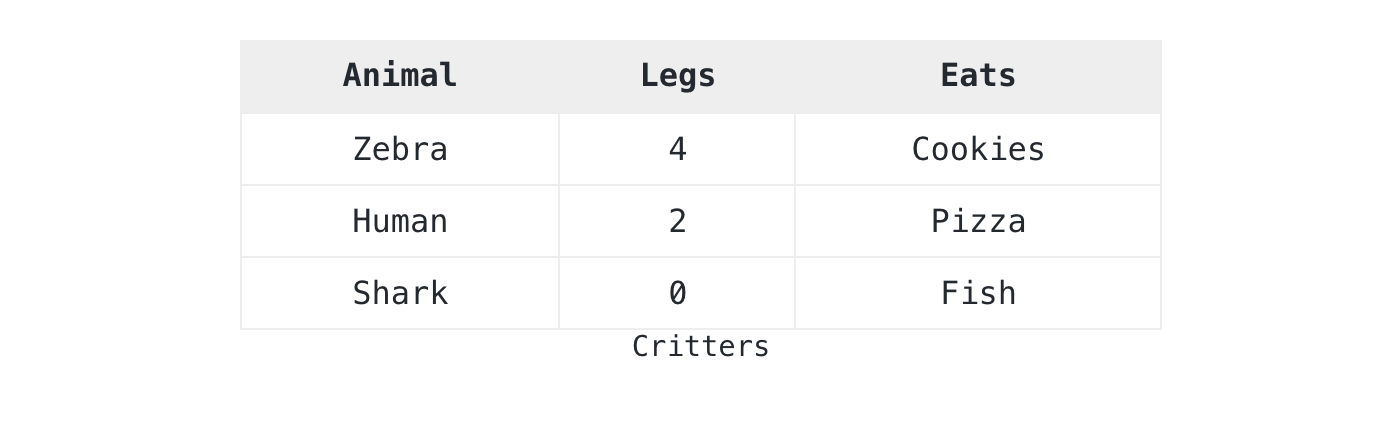 The parser handles whitespace, pipes, or plus signs as column boundaries. A The parser handles whitespace, pipes, or plus signs as column boundaries. A ===== line marks the previous row as a header. I reach for this form first when I’m typing into a notebook. It stays readable as I edit, and it survives copy-paste from a terminal.The second syntax is structured. Use it when you need cell spans, semantic markup, or rich content in cells. Each row and each cell becomes its own block. The ===== line becomes a :header attribute on the row:=begin table :caption('My coffee morning')=begin row :header=cell Step=cell Tool=cell Time=end row=begin row=cell Grind=cell Burr grinder=cell 20s=end row=begin row=cell Brew=for cell :colspan(2)Aeropress, 90 seconds with bloom=end row=end table
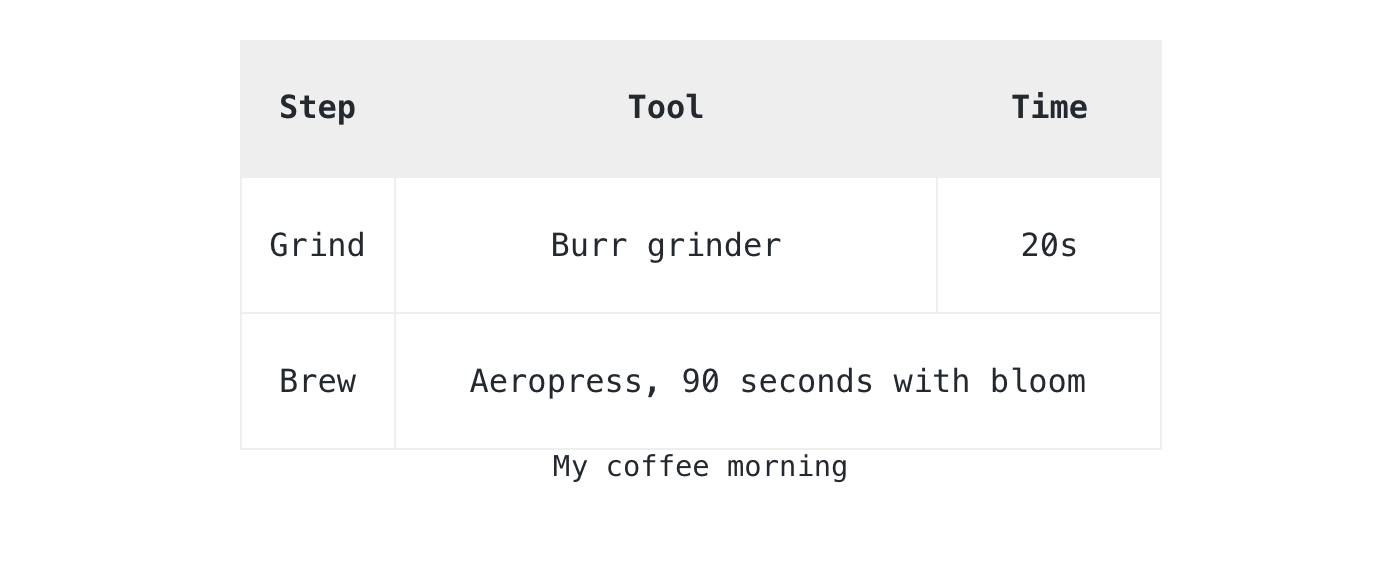 A cell can hold any Podlite block: a paragraph, a code block, a picture, an embedded diagram. This call was made early in the spec: tables in Podlite are not a visual feature, they are containers that render as a grid.The third syntax is data-driven. If the numbers are short enough to live in the document, put them directly inside a A cell can hold any Podlite block: a paragraph, a code block, a picture, an embedded diagram. This call was made early in the spec: tables in Podlite are not a visual feature, they are containers that render as a grid.The third syntax is data-driven. If the numbers are short enough to live in the document, put them directly inside a =data-table block:=begin data-table :caption('Build status') :mime-type<'text/csv; header=present'>component,statusparser,greenrenderer,greenplayground,yellow=end data-table
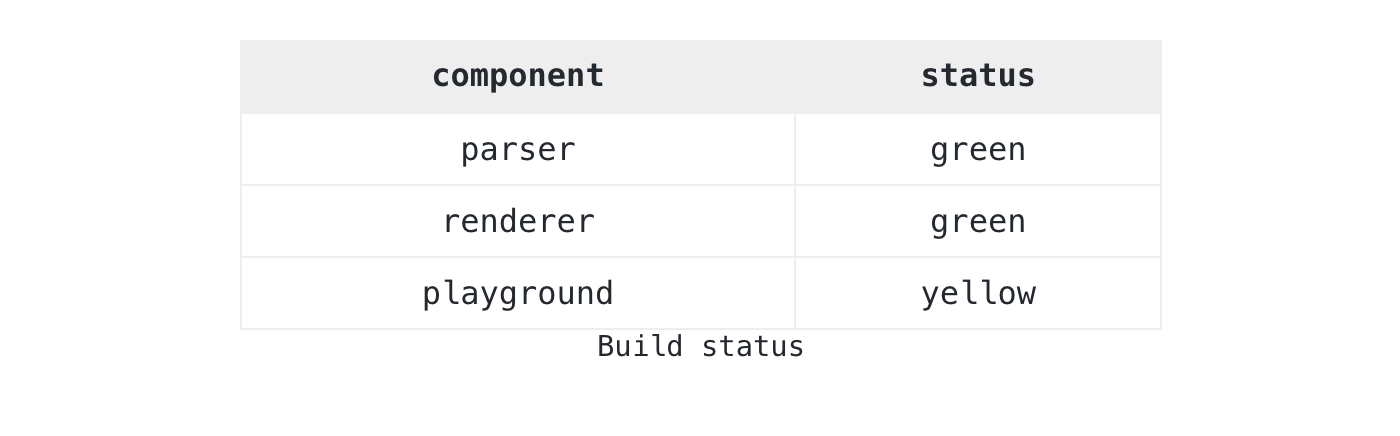 Some data has its own life: a CSV export, a TSV log, anything that exists before the document does. Keep it in a separate Some data has its own life: a CSV export, a TSV log, anything that exists before the document does. Keep it in a separate =data block and reference it via :src. If the data starts with column labels, mark them with the header=present parameter from RFC 4180 3:=for data-table :src<data:walks> :caption('Walks this month')=begin data :key<walks> :mime-type<'text/tab-separated-values; header=present'>datedistancenote2026-04-125kmmorning fog2026-04-153kmpark loop2026-04-228kmcoastal trail=end data
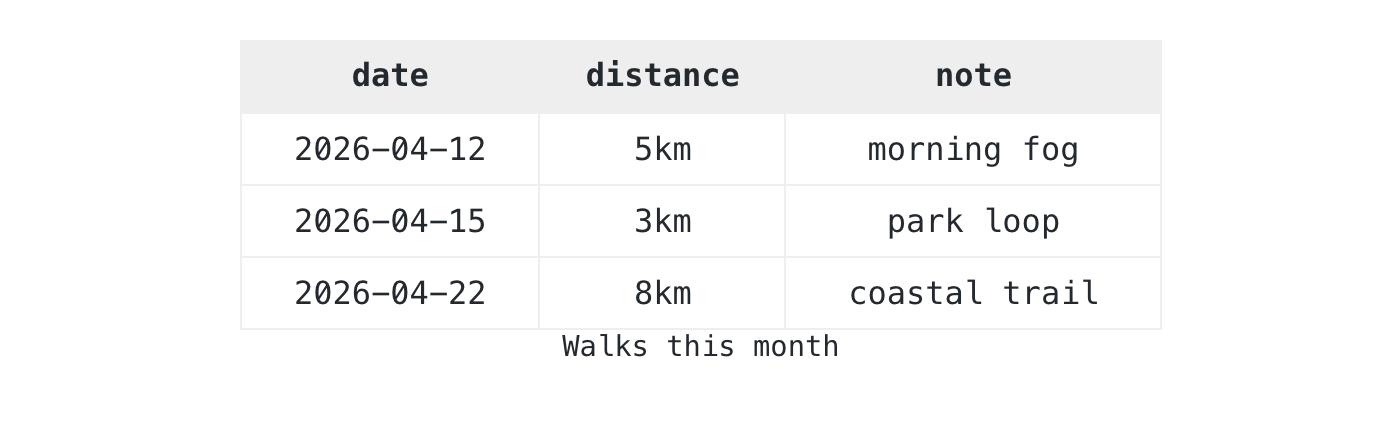 The The =data block holds raw TSV: tab-split, no quoting, which is what most TSV tools emit. Tools that walk the document read the structured data directly, and readers see the rendered table from the same source.When tables breakTables break in real documents. A copy-paste loses a column, two rows pick different separators, a CSV cell holds an unmatched quote. The Podlite spec defines four rules so the parser warns you instead of silently corrupting the document:- Per-line separator detection. Each row decides its separator from what it sees.
- Cell count validation. Short rows pad with empty cells, long rows truncate. Both produce a warning.
- Mixed-separator warning. Pipes in the header and whitespace in data still work, but you get a warning.
- CSV recovery. Missing data renders an empty table. A non-CSV MIME type falls back to a
=code block so the content stays visible.
I’d rather see a warning in the console than ship a document with a dropped row.Try itPaste any of these examples into pod6.in. The playground renders Podlite live, no install needed. The full table grammar lives in the Podlite specification.If you build something with this, or hit a case the spec does not cover, open a discussion at podlite-specs.Thanks for reading,Alex
Read more here
posted at: 12:00am on 16-Jul-2026
path: /Programming/Perl | permalink
comment...

|
|