HeroDevs Donates $10,000 to The Perl and Raku Foundation
Furnished content.
The Perl and Raku Foundation is delighted to announce that HeroDevs has donated $10,000 to support our work. We’re grateful for their generosity gifts like this go directly toward the people and infrastructure that keep Perl and CPAN healthy.HeroDevs provides long-term security and support for open source software that has reached its end of life.As we continue to see support from community members and corporate sponsors,2026 has been shaping up to be a genuinely good year for Perl and CPAN.The CPAN Security Grouphas been very busy with security research, publishing CVEs and patching some of theexploits which they have found.Alpha-Omega funded thatwork,which was a solid vote of confidence in the ecosystem. The CPAN Security Group is also workingwith other packaging ecosystems to learn from their experiences fighting thesame battles. This is the kind of work that cannot be done solely byvolunteers. We would like to see it funded on an ongoing basis.Meanwhile, the ecosystem itself is growing. Comparing January to August 2026against the same period in2025,we can see significant growth in CPAN across multiple metrics. The first-timereleaser number is particularly encouraging. It’s great to see people decidingto publish on CPAN for the first time.- First-time releasers: 31 to 54, up 74%
- New distributions: 464 to 1,007, more than double
- Uploads: 6,276 to 9,430, up 50% already past last year’s full-year total with four months to go
- Distinct authors releasing: 489 to 546, up 12%
 | Uploads | Jan | Feb | Mar | Apr | May | Jun | Jul | Aug | | 2025 | 1,704 | 708 | 727 | 896 | 670 | 507 | 512 | 552 | | 2026 | 1,189 | 866 | 1,430 | 1,190 | 919 | 1,052 | 1,368 | 1,416 | | Change | -30.2% | +22.3% | +96.7% | +32.8% | +37.2% | +107.5% | +167.2% | +156.5% | The in-person side has been busy as well. The Perl ToolchainSummitmet in beautiful Vienna, Austria in April to work on the infrastructure everyone dependson and nobody sees. The Perl and RakuConference ran in Greenville, South Carolinain June, and the London Perl & Raku Workshop is comingup in the UK at the end of November. Perl 5.44 also shipped in July theannual stable release, succeeding 5.42 (odd versions like 5.41 and 5.43 beingdevelopment-only).It has been a good year, but there’s plenty still to do and we need your help to do it.If your organization is interested in becoming a TPRF donor, please reach outto me. I’d be more than happy to set up acall so that we can discuss how a donor relationship with TPRF canbenefit your organization.
Read more here
posted at: 12:00am on 12-Sep-2026
path: /Programming/Perl | permalink | edit (requires password)
Alpha-Omega Donates USD 250,000 for Perl and CPAN Security
Furnished content.
Photo: Stian Kristoffersen; Editing: Salve J. Nilsen. In picture, from left: Paul Johnson, Stig Palmquist, Leon Timmermans, Robert Rothenberg, Salve J. Nilsen, Timothy Legge, and Olaf Alders.CPAN Security Group (CPANSec) and The Perl and Raku Foundation (TPRF) are happy to announce the April Task Force. This project is set up to strengthen the CPANSec CNA Function, improve the security posture of CPAN and Perl, and to help prepare these communities for the impact expected from the general availability of security analysis-capable Large Language Models.The April Task Force is fiscally hosted by The Perl and Raku Foundation and backed by a USD 250,000.00 grant from Linux Foundation and OpenSSF through the Alpha-Omega project.This funding follows the September 2025 OpenSSF open letter and the wider recognition that the major package registries - CPAN among them - need structured investment to keep pace with commercial-scale use. Scope and workThe task force will be focusing on:- Streamlining CVE processes and CNA function including workflow tooling for triage, creation, verification, and publishing
- Vulnerability work measurable backlog reduction in core Perl, CPAN tooling, and critical distributions
- Supply chain security improved CPAN maturity against the OpenSSF Principles for Package Repository Security
- Long-term sustainability and funding of the Perl and CPAN security communities and ecosystem
- Participation in and contribution to Alpha-Omega’s Security engineers-in-residence program, and cross-ecosystem forum for package registries
The teamLeon Timmermans Perl Steering Council member; Core Perl security, encryption-related modulesOlaf Alders MetaCPAN founder; CPAN publishing infrastructure, auditing CVE findings, maintainer outreach, patches development; Grant managerPaul Johnson Devel::Cover project lead; CPAN XS distributions, process automationRobert Rothenberg Long-term contributor to open source and Perl; Vulnerability research, CVE reporting, communication, triage workflowSalve J. Nilsen Long-term Perl community volunteer; Project facilitation, organizational design, policy, compliance and metadata, sustainabilityStig Palmquist Vulnerability research, exploit development, CNA processTimothy Legge Cybersecurity professional; CNA process, triage workflow, vulnerability researchFiscal host: The Perl and Raku FoundationThe Perl and Raku Foundation has predominantly assumed a “hands-off” role in the Perl and Raku communities, following a “servant leadership” philosophy for supporting these.With this funding, the foundation for the first time puts on the mantle of a facilitator and fiscal host.This is both in recognition of the changing legislative landscape, where EU regulations like NIS2 and CRA will require businesses to secure their applications, services and products - and that these changes in this landscape are likely to affect the Open Source Software projects affected businesses rely on.While the core activities that make Open Source fun and worth doing should remain and be protected, there is new work laid before us. Some of it is necessary, but too tedious to attract volunteers.A change in how Perl and CPAN Security can be supportedIn their grant letter, the Linux Foundation state it succinctly.Perl [is] among the most critical and widely-used projects in the open-source ecosystem, and any vulnerabilities therein would have a significant impact on The Linux Foundation’s members, and the public at large. Every major commercial user of Perl is already paying for some version of this work. Internal teams monitor CPAN advisories, maintain private patches, respond to incidents under time pressure, and absorb the cost of unaddressed backlogs when something surfaces. Today, none of this shows up as a budget line item called “CPAN security”, even if the cost is real and being paid needlessly in parallel across the industry.The April Task Force provides a new opportunity to facilitate a “shift left” for cost-saving across the industry. To enable this, TPRF is establishing a mechanism for ongoing corporate sponsorship of this work; details will follow in the foundation’s revised fundraising goals.Furthermore, we are exploring novel funding mechanisms expected through the EU Cyber Resilience Act, to facilitate the support of Perl and CPAN projects and communities through offering compliance-relevant assurances.How to engage- Report vulnerabilities through the CPAN Security Group.
- Engage directly with the CPAN Security Group on enterprise concerns.
- Allocate software engineering and security champion resources to OSS security work.
- Prepare your budgets for sustained support of your digital infrastructure commons.
The digital commons Perl and CPAN are part of, and industry relies on, cannot thrive on bystanders. Industry engagement is key both for its own long-term security posture, and for society at large.About the CPAN Security GroupThe CPAN Security Group (CPANSec) is a group of volunteers from the Perl community who work to support the security of the Perl ecosystem through education and outreach, security analysis of open source Perl distributions on CPAN, and support for fixing security vulnerabilities. CPANSec was founded at the Perl Toolchain Summit 2023 in Lyon.About the Perl and Raku FoundationThe Perl and Raku Foundation (TPRF) is a volunteer-led 501(c)(3) non-profit dedicated to advancing the Perl and Raku programming languages. The foundation provides financial, legal, and organizational stewardship that keeps both languages freely available and actively developed funding core maintenance and development grants, producing community conferences, and supporting shared infrastructure and user groups.Links
Read more here
posted at: 12:00am on 21-Jul-2026
path: /Programming/Perl | permalink | edit (requires password)
Three ways to write a table in Podlite
Furnished content.
In my previous article I introduced Podlite as a block-based markup language. Today I’ll zoom into one piece: tables.I write tables in three rough shapes: a few rows of words I’m jotting down, a visual grid like a tic-tac-toe board, or a data export I want to embed in a document. Podlite has three syntaxes around the same model, one per shape. The first has several flavors, so let’s start with that.One model, three syntaxesThe first syntax is text-mode. It’s flexible. The simplest version is =table followed by rows. Pipes for separators:=table mouse | mice horse | horses elephant | elephants
 Plus signs work too, and you can leave cells empty: Plus signs work too, and you can leave cells empty:=table X | O | ---+---+--- | X | O ---+---+--- | | X
 That renders as a tic-tac-toe board. Three rows of three cells, same table model as anything else.When you want a header and a caption, use the delimited form. Add That renders as a tic-tac-toe board. Three rows of three cells, same table model as anything else.When you want a header and a caption, use the delimited form. Add :caption(...) and put a ===== row under the head:=begin table :caption('Critters') Animal Legs Eats ====== ==== ==== Zebra 4 Cookies Human 2 Pizza Shark 0 Fish=end table
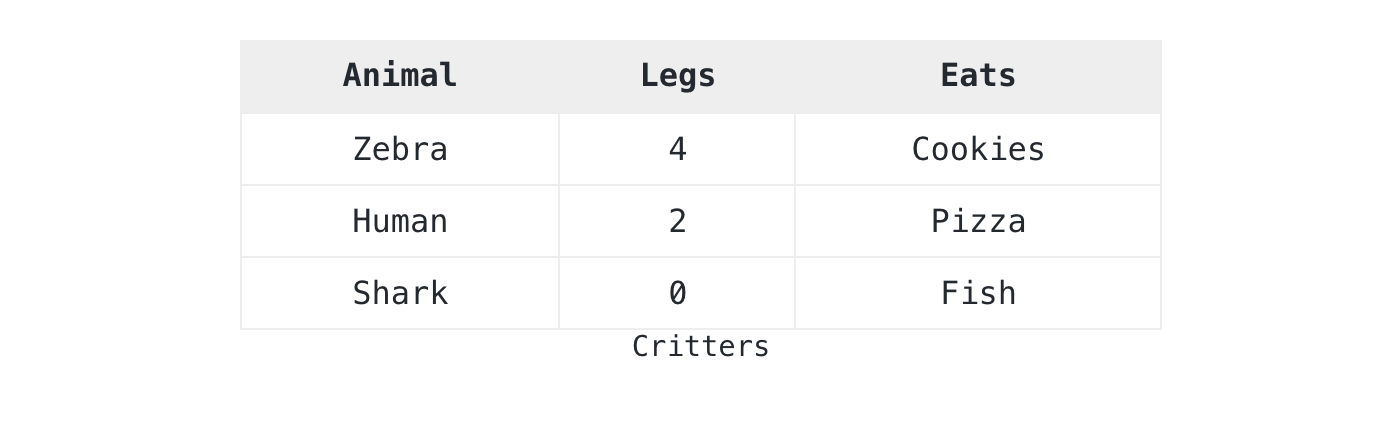 The parser handles whitespace, pipes, or plus signs as column boundaries. A The parser handles whitespace, pipes, or plus signs as column boundaries. A ===== line marks the previous row as a header. I reach for this form first when I’m typing into a notebook. It stays readable as I edit, and it survives copy-paste from a terminal.The second syntax is structured. Use it when you need cell spans, semantic markup, or rich content in cells. Each row and each cell becomes its own block. The ===== line becomes a :header attribute on the row:=begin table :caption('My coffee morning')=begin row :header=cell Step=cell Tool=cell Time=end row=begin row=cell Grind=cell Burr grinder=cell 20s=end row=begin row=cell Brew=for cell :colspan(2)Aeropress, 90 seconds with bloom=end row=end table
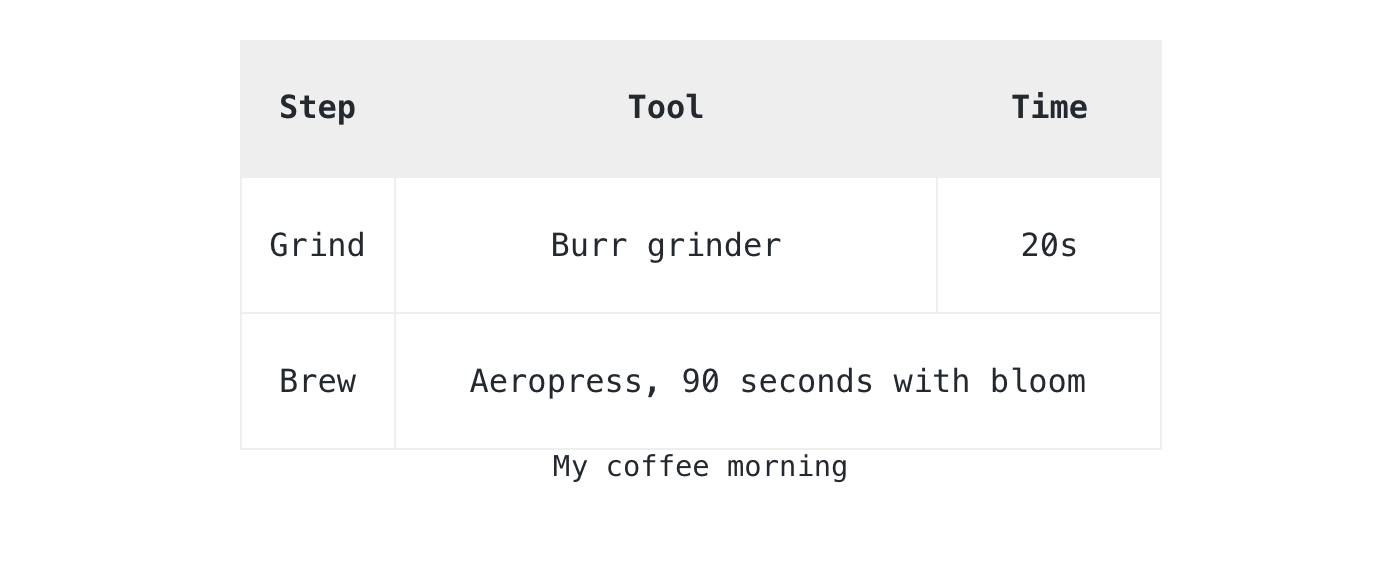 A cell can hold any Podlite block: a paragraph, a code block, a picture, an embedded diagram. This call was made early in the spec: tables in Podlite are not a visual feature, they are containers that render as a grid.The third syntax is data-driven. If the numbers are short enough to live in the document, put them directly inside a A cell can hold any Podlite block: a paragraph, a code block, a picture, an embedded diagram. This call was made early in the spec: tables in Podlite are not a visual feature, they are containers that render as a grid.The third syntax is data-driven. If the numbers are short enough to live in the document, put them directly inside a =data-table block:=begin data-table :caption('Build status') :mime-type<'text/csv; header=present'>component,statusparser,greenrenderer,greenplayground,yellow=end data-table
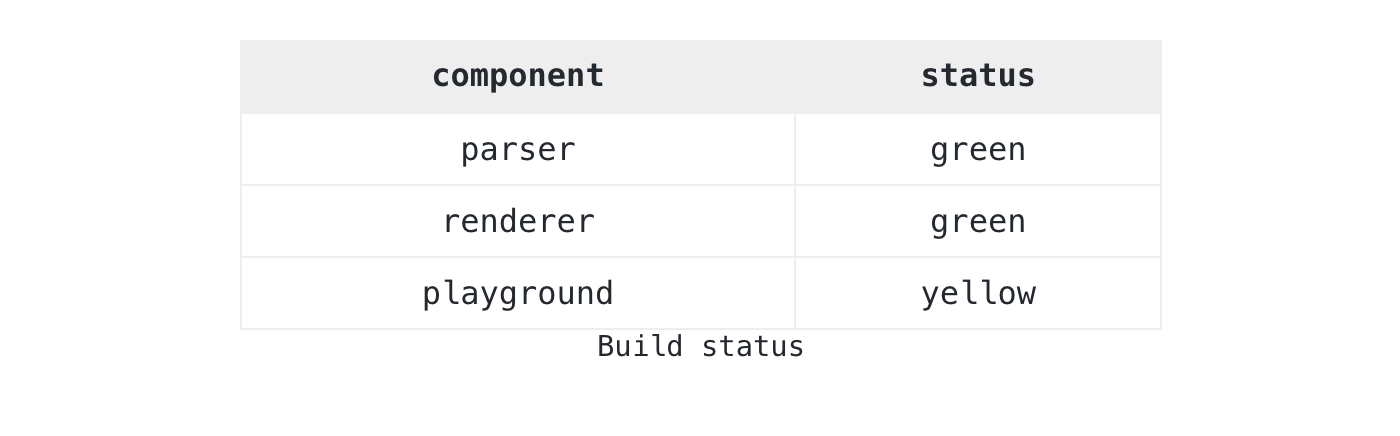 Some data has its own life: a CSV export, a TSV log, anything that exists before the document does. Keep it in a separate Some data has its own life: a CSV export, a TSV log, anything that exists before the document does. Keep it in a separate =data block and reference it via :src. If the data starts with column labels, mark them with the header=present parameter from RFC 4180 3:=for data-table :src<data:walks> :caption('Walks this month')=begin data :key<walks> :mime-type<'text/tab-separated-values; header=present'>datedistancenote2026-04-125kmmorning fog2026-04-153kmpark loop2026-04-228kmcoastal trail=end data
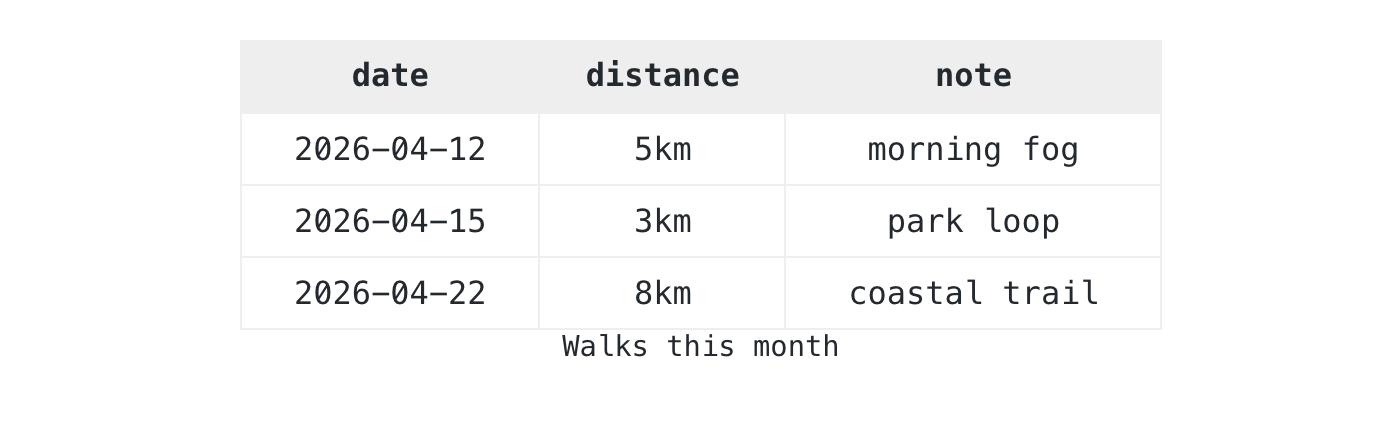 The The =data block holds raw TSV: tab-split, no quoting, which is what most TSV tools emit. Tools that walk the document read the structured data directly, and readers see the rendered table from the same source.When tables breakTables break in real documents. A copy-paste loses a column, two rows pick different separators, a CSV cell holds an unmatched quote. The Podlite spec defines four rules so the parser warns you instead of silently corrupting the document:- Per-line separator detection. Each row decides its separator from what it sees.
- Cell count validation. Short rows pad with empty cells, long rows truncate. Both produce a warning.
- Mixed-separator warning. Pipes in the header and whitespace in data still work, but you get a warning.
- CSV recovery. Missing data renders an empty table. A non-CSV MIME type falls back to a
=code block so the content stays visible.
I’d rather see a warning in the console than ship a document with a dropped row.Try itPaste any of these examples into pod6.in. The playground renders Podlite live, no install needed. The full table grammar lives in the Podlite specification.If you build something with this, or hit a case the spec does not cover, open a discussion at podlite-specs.Thanks for reading,Alex
Read more here
posted at: 12:00am on 16-Jul-2026
path: /Programming/Perl | permalink | edit (requires password)
Musical Rhythms with Math in Perl
Furnished content.
Read more here
posted at: 12:00am on 30-Jun-2026
path: /Programming/Perl | permalink | edit (requires password)
|
|